

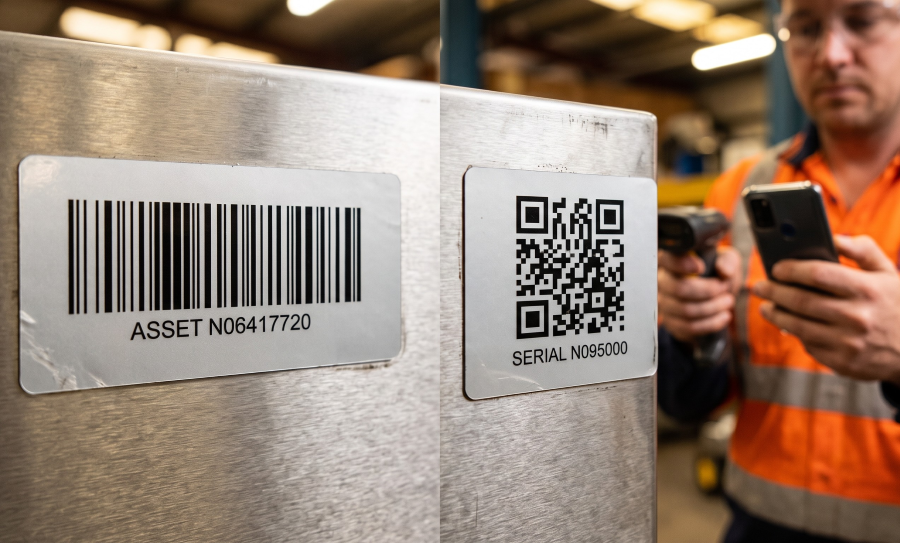
QR Code vs Barcode Asset Tags: Which to Specify
Choosing QR code vs barcode asset tags comes down to one question: does the person scanning the tag need more than a number? A 1D barcode holds a short identifier, reads quickly on a dedicated scanner, and is all a fixed asset register needs when every scan happens inside the inventory system. A QR code holds a longer string, including a web address, and reads on a phone camera, which matters when field staff, the public or a check-out desk need the tag to open a record without a scanner in hand. Either way the tag carries a human-readable number, and the material under the code decides how long it stays scannable.
What each code stores
A 1D barcode encodes a short string of characters as bars and spaces, read in one direction. On an asset tag that string is the asset number, and the barcode does nothing more than let a scanner capture that number without keystrokes. Everything else about the asset lives in the register, keyed to the number.
A QR code encodes data in two dimensions, so it holds far more in a similar footprint: a longer identifier, several fields, or a URL that opens a record or a page. On QR barcode labels, the code can contain sequential numbers, unique numbers from a file, or static data such as a link to a company website or product page.
Storing more is not automatically better. A register keyed on a number gains nothing from a code that also carries the description and the purchase date, because those fields change and a printed code does not. Put the identifier in the code and keep the changeable data in the system.
How each code is scanned
1D barcodes and dedicated scanners. Handheld scanners are the standard tool for 1D codes. The count team scans, the record comes up in the inventory application, and the operator confirms location and condition. Nothing has to be typed, and the scanner does not depend on lighting or steady hands the way a phone camera does.
QR codes and phone cameras. Phone cameras read QR codes readily, usually without a separate app. That opens the tag to people who will never carry a scanner: a technician on a service call, a visitor reporting a fault, a staff member borrowing a projector. If the code holds a URL, the phone opens the linked page directly.
Many scanners read both code types, and many phone apps read 1D barcodes. Before deciding, check what the people who will actually scan the tag already carry. A code that the count team’s existing hardware cannot read is a code that gets keyed in.
Size against data density
Tag size is set by the asset, not by the code. A small tag on a laptop lid or a hand tool has room for a short barcode or a modest QR code, and the code has to fit legibly in that space.
1D barcodes grow sideways. Every extra character adds bars, so a long identifier on a narrow tag forces the bars closer together and makes the code harder to read. Short asset numbers keep 1D barcodes compact and reliable.
QR codes grow in both directions. A longer string means more, smaller modules in the same square. A full web address on a small tag produces modules that a phone struggles to resolve, especially on a curved surface or in poor light. Keep the encoded string short: a short identifier or a short link that the server resolves, rather than the full path to the record.
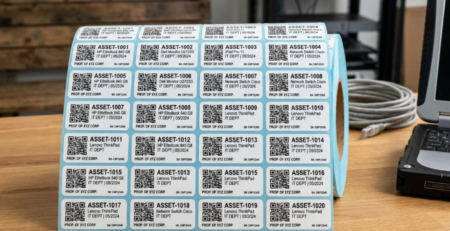
The QR asset tags article covers how the data in the code is set up and matched to the register. The QR code labels themselves come in ¾ × 1⅞ and 1 × 2 inches, in quantities from 250 to 5,000.
When a QR code linking to a record helps
A QR code earns its place when the tag has to do more than feed a number into the inventory system.
Field service. A technician scans the tag on a pump, a compressor or a switch cabinet and opens its service history, manual or parts list on a phone, without logging into a laptop. A tag is only as useful as the record behind it; this guide on why asset maintenance history matters covers what that record should hold. The industrial asset tags article covers what the tag itself has to survive in those locations.
Public and shared equipment. Equipment in public areas, from AV carts to exercise machines, can carry a code that opens a fault-reporting form or usage instructions. The person scanning it does not need an account or an app.
Check-in and check-out. Loan desks, tool cribs and device programs use the scan to open the item’s record so it can be issued and returned against a name. A phone at the desk is enough.
In each case the code links to a page that has to be maintained for as long as the tag is on the asset. A printed URL cannot be updated, so the address it points to needs to be one the organization can keep alive, or redirect, for the life of the equipment.
When a plain barcode is all the register needs
Most fixed asset registers are scanned by staff, during counts and transfers, with scanners connected to the inventory system. The register holds the description, the location and the history; the tag only has to deliver the number. In that case a 1D barcode with a human-readable number is the complete specification. It takes less space, it prints cleanly on a small tag, and it does not depend on a web page staying online.
Specify the barcode when nobody outside the count team will scan the tag, when the scanning hardware is already in place, and when there is no record or page that a scan needs to open. Add the QR code when one of those conditions changes.
Keep the human-readable number either way
Both code types fail the same way: a scratch, a scuff or a smear across the code and the scanner reports nothing. The printed number under the code is the fallback. The counter types it, the technician reads it out over the phone, and the register still matches. Specify the number in a type size that can be read at arm’s length, and place it where it will not be covered by the code or trimmed by the tag edge.
Print durability
A code is only as scannable as the surface it is printed on. Scanners and cameras need contrast between the code and the background and an intact face; fading, abrasion and glare all reduce read rates.
Face material. A PolyAsset White label has a white semi-gloss polyester face, the finish for barcodes that are scanned routinely. The polyester asset labels article explains why the material holds up where paper and vinyl do not.
Reflective faces. A mirror or chrome finish interferes with scanning. PolyCheck Chrome is specified for tamper evidence, not for barcodes, for that reason. If the tag has to be both tamper-evident and scannable, choose a construction listed as barcode-capable.
Protected print. Laminated asset tags carry a clear laminate over the barcode and print, which keeps both readable on equipment that is handled, wiped down or stacked.
The same rules apply to a QR code and a 1D barcode. A QR code has no durability advantage over a barcode on the same material; what changes is how much it holds and who can read it.
Specifying QR code vs barcode asset tags
Specify a 1D barcode when the tag only has to deliver an asset number to the inventory system, and a QR code when a phone scan has to open a record, a form or a page. In both cases print the human-readable number and put the code on a face made for scanning.
Tell us the quantity, the tag size the asset allows, what the code needs to contain and where the tags will be applied, and we will quote the right construction. Request a quote for QR code or barcode asset tags, or request samples to test the scan on your own equipment.


Leave a Reply
You must be logged in to post a comment.