

IT Asset Tags: Where to Place Them on Laptops, Monitors and Servers
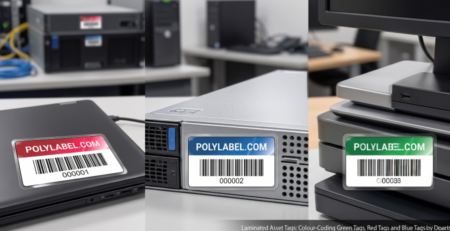
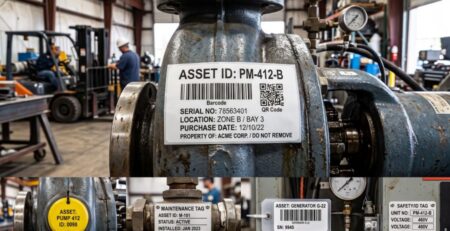
IT asset tags go where they can be read without moving the device, on a flat surface that is not handled, vented or covered, and in the same place on every device of the same type. That last rule matters more than any single location: a technician who knows the tag is always on the bottom-left of a laptop, the back of a monitor and the front bezel of a server finds it in seconds. The device type sets the options. Below are the placements that work for each class of hardware, and the tag choices that go with them.
Placement rules that apply to every device
Four rules cover most of the decision before device type comes into it.
Flat and rigid. Curves, ribbed textures and soft-touch coatings reduce adhesive contact. Pick the flattest area available.
Not over anything functional. Vents, ports, speaker grilles, seams that open for service, battery doors and antenna windows on phones and tablets are all off limits. A tag over a vent restricts airflow; a tag over a seam has to be destroyed at the first repair.
Not where hands or surfaces wear it. Palm rests, the underside edges where a laptop is picked up, and the face of a mouse are abraded daily. The tag should be somewhere it is seen but not touched.
Not on a removable part. Batteries, lids, stands, cable covers and docking sleds can be swapped between devices. Tag the chassis, not the accessory.
The how to asset tag equipment article covers the surface preparation and application steps that apply once the spot is chosen.
Laptops: lid or bottom
The two candidates are the outside of the lid and the underside of the base, and each has a case.
Lid. The tag is visible while the laptop is closed on a desk or in a stack, which suits fleets that are counted or checked out without being opened. The cost is exposure: the lid is what goes into and out of bags, rubs against other equipment and gets stickered by users. Sleeves and hard cases also cover it.
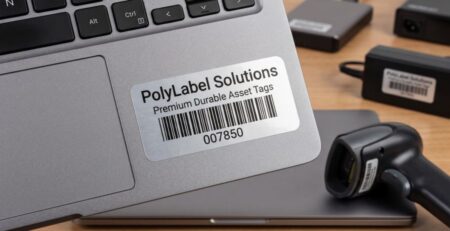
Bottom. The tag is protected and sits next to the manufacturer’s serial plate, so serial number and asset number are read together, which is what most helpdesk and warranty workflows need. The cost is that the laptop has to be flipped to read it, and the bottom carries vents, feet and screws that limit the flat area. Place the tag on the flat panel between the feet, clear of the vents and the service screws.
For a device that has to be found on a desk without touching it, use the lid, near the hinge edge where hands rarely go. For a device that is mostly identified at the helpdesk or during a count that already handles the machine, use the bottom beside the serial plate. Either way, apply it in the same place on every unit. School and district device fleets have their own placement and property-marking considerations, covered in the student laptop labels article.
Monitors: back panel, not bezel
Monitor bezels are narrow, often glossy and increasingly nonexistent. A tag on the bezel is either too small to read or sits in the user’s field of view.
Put the tag on the back panel, on the flat area near the input ports or the serial label, where a technician working behind the desk will look. Keep it clear of the VESA mount area and the stand attachment, since either may be covered by an arm or a bracket.
Desktops and servers: front bezel and rack rail
Desktops and small form factor PCs. The front of the chassis is visible under a desk and does not move when cables are connected. Place the tag on the front bezel, clear of the power button, drive bays and front ports.
Servers and network equipment. Rack-mounted hardware is identified from the front of the rack, so the tag goes on the front bezel or the fixed front flange, in a consistent position across every unit in the rack. Tag the chassis rather than a removable bezel. Where the front is fully occupied, tag the rack rail or the fixed mounting ear at the chassis, not the sliding rail, which may be reused with a different server.
Phones and tablets: case or back
Phones and tablets have little flat area that is not glass, camera or antenna window, and a case usually covers most of it.
Where a device is issued with a case, tag the case’s back and record in the register that the tag is on the case, since a case can be swapped. Where the device itself must carry the tag, use the back of the device, away from the camera module and the antenna lines, and choose a small tag. The laminated tags in the laminated asset tags article come down to ½ × 1 inch, which fits the back of a phone without covering anything functional, and the laminate protects the print from pocket and bag abrasion.
Peripherals: dock, external drive, and what not to tag
Docking stations, external drives, conference cameras and hotspots carry enough value to be tracked. Tag the dock on its top or front face clear of the cables, and external drives on the flat top surface, away from the connector end. Keyboards, mice and headsets are typically expensed rather than capitalized and are rarely worth a tag; tagging them adds count exceptions without adding control.
Tamper-evident tags for high-value devices
A standard tag identifies the device. A tamper-evident tag also shows if someone tried to move the identity to another device or remove it before a resale or a disposal. For laptops, phones and servers that are worth more than the effort of a swap, specify tamper evidence.
A PolyVoid White label shows the word VOID on both the label and the surface when it is lifted, so a removed or reapplied tag is visible on the device itself. PolyBreak White Destructible fragments on removal and cannot be transferred at all. PolyCheck Platinum leaves a checkerboard pattern when removed and can carry a barcode, which keeps a tamper-evident tag scannable; PolyCheck Chrome gives the same pattern with a mirror finish but is not specified for barcodes.
Scannable tag faces
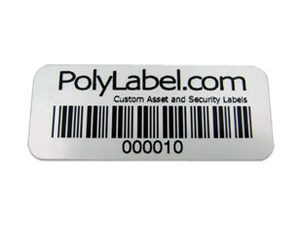
The count and the helpdesk will both scan the tag, so the face has to be one that scanners read reliably. A PolyAsset White label has a white semi-gloss polyester face, which is the finish specified for barcodes that are scanned routinely. PolyAsset Platinum is a metallic polyester with an aluminum-look face, for equipment where the tag should suit a metal finish; sample-test it with your own scanners before a fleet-wide order. Mirror and chrome finishes are the ones to avoid under a barcode.
Print the human-readable asset number on every tag, under the barcode, in a size that can be read at arm’s length.
Asset number versus serial number
The two are different keys and both belong on the register.
The serial number is assigned by the manufacturer, is unique to that unit, and is what warranty, support and recall processes use. It is already on the device, usually on a small plate on the bottom or back.
The asset number is assigned by the organization, is the key to the register, and stays in the organization’s numbering scheme regardless of make or model. It is what the count, the helpdesk ticket and the disposal record use.
The asset tag carries the asset number. The register links it to the serial number once, at deployment. For what else belongs in the register beside those two keys, this guide to the core fields of an equipment asset register is written for medical equipment, but the field structure carries over to IT hardware. Do not print the serial on the tag: it is already on the device, it invites transcription errors, and it ties the tag to one unit if the tag is applied before the serial is confirmed.
QR codes for helpdesk lookup
Where the helpdesk wants to open the device record from a phone, without a scanner, the tag can carry a QR code that links to the record. The technician at a desk scans the tag and sees the user, the warranty status and the ticket history. The QR asset tags article covers how the code is specified and tied to the register; keep the encoded string short so the code stays readable on a small tag.
Specifying IT asset tags
Specify IT asset tags on a flat, fixed, visible surface, in the same place on every device of a type: lid or bottom on laptops, back panel on monitors, front bezel on desktops and servers, case or back on phones. Put the barcode on a white semi-gloss face, add tamper evidence on high-value devices, and print the asset number rather than the serial.
Tell us the device types, quantities, whether the tags carry a barcode or QR code, and which devices need tamper evidence, and we will quote the right construction. Request a quote for IT asset tags, or request samples to test the tag on your own devices.